Introduction
Most document management systems feel like they were built for engineers not for the everyday person who just needs to find a file quickly. That frustration is real. You have spent 20 minutes searching through folders, clicking through cryptic menus, and still cannot locate that one contract from last quarter. Sound familiar?
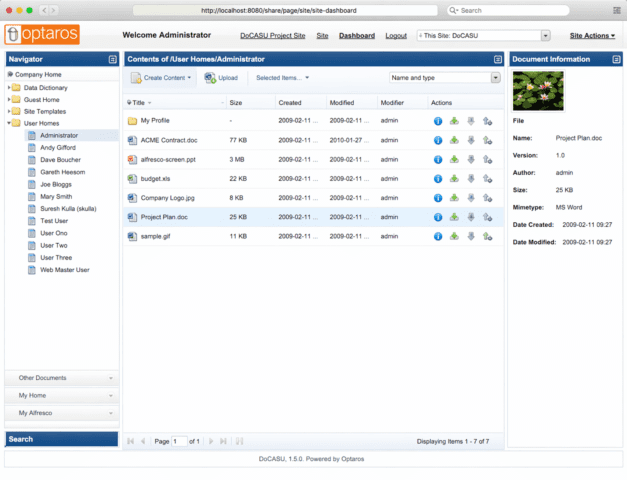
DoCASU is a simple, user-friendly document management interface built on top of Alfresco that helps non-technical users easily find, manage, and share files. It works by simplifying Alfresco’s complex system into a clean web-based interface, offering features like document search, version control, metadata viewing, and easy file sharing making it ideal for everyday employees who need quick and hassle-free access to documents.
What Is DoCASU? (Complete Definition + Context)
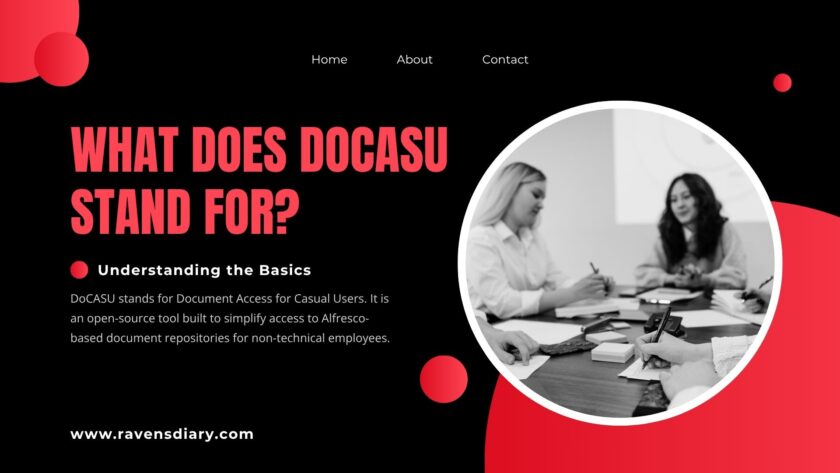
Here is the short answer. DoCASU stands for Document Access for Casual Users. That name alone tells you everything about its philosophy. It was created to bridge the gap between powerful enterprise content management (ECM) platforms particularly Alfresco and the non-technical employees who need to use them every day.
Think of it this way. Alfresco is like a professional-grade industrial kitchen. Powerful? Absolutely. But hand it to someone who just wants to make toast, and you have a problem. DoCASU is the simple toaster sitting beside it it uses the same kitchen infrastructure but removes the complexity for people who do not need it.
The DoCASU software was developed by Optaros, a technology consultancy, and was led by open-source community figure Jeff Potts a respected name in the Alfresco ecosystem. It was released under the GPL v3 license, making it a fully free, open-source document management tool. Originally hosted on SourceForge, it later became accessible via platforms like OnWorks for browser-based demos.
| Term | Meaning |
|---|---|
| DoCASU Full Form | Document Access for Casual Users |
| License | GPL v3 (Open Source) |
| Built On | Alfresco ECM |
| Developer | Optaros / Jeff Potts |
| Primary Goal | Simplify document access for non-technical users |
Who Should Use DoCASU? (Audience + Use Cases)
Let us be direct. DoCASU is not built for your IT department. It is built for everyone else. The receptionist managing HR forms. The sales rep uploading client proposals. The marketing coordinator trying to retrieve last month’s brand assets. These are casual users knowledge workers who need fast, clean document access without a training manual.
That said, developers and decision-makers also have a stake here. Developers benefit from understanding its RESTful API and Alfresco Web Scripts architecture when building or customizing deployments. Decision-makers think operations directors or IT managers will want to evaluate it against alternatives before rolling it out across a team.
In 2026, the strongest use cases for DoCASU include small-to-mid-sized businesses already running Alfresco, educational institutions managing administrative documents, and nonprofits that need free, functional open-source document management without enterprise licensing costs.
Key Features of DoCASU | Deep Dive
What Makes DoCASU’s Feature Set Genuinely Useful
Do not let its simplicity fool you. Underneath that clean user-friendly interface sits a capable set of tools built for real document workflow needs. The DoCASU interface is built on the Ext JS framework, which delivers a smooth rich internet application (RIA) experience directly in your browser no software installation required on the user’s end.
The core DoCASU features cover the full document lifecycle. You get version control, so older file versions are never permanently lost. Metadata management allows teams to tag and categorize documents meaningfully making search faster and more accurate. Check-in and check-out functionality prevents conflicting edits when multiple users need the same file. And file sharing is handled cleanly without needing a third-party tool.
What competitors rarely mention is DoCASU’s deliberate user-centered design. Every feature is filtered through one question: can a non-technical person use this without help? That design discipline is rare. Most ECM tools add features for power users and ignore usability for the rest. DoCASU does the opposite and that is exactly where its value lives.
How DoCASU Works | Technical Architecture (Simplified)
Here is where things get interesting for the developers in the room. DoCASU operates as a web-based interface layered on top of Alfresco, communicating via a RESTful API. The frontend built with Ext JS framework handles what you see and interact with. The backend stays entirely within Alfresco’s document management system infrastructure.
The separation between frontend and backend is intentional. It means DoCASU can be customized, extended, or even swapped for a different frontend without touching the Alfresco repository underneath. Alfresco Web Scripts power the API layer, acting as a clean bridge between the two. This architecture follows modern frontend-backend separation principles the same ones used in larger enterprise applications today.
For teams already running Alfresco, this is particularly elegant. You do not rebuild your document repository. You simply add a friendlier face to it. That means your existing file management workflows, permissions, and data structures stay intact. DoCASU just makes them accessible to people who previously had no path in.
How to Install and Set Up DoCASU (Step-by-Step)
Setting up DoCASU is more approachable than most ECM software but it does require an existing Alfresco environment. Here is a simplified, realistic walkthrough for 2026.
- Step 1: Prerequisites. Ensure you have a running Alfresco instance (Community Edition works fine). You will also need Java and a supported application server like Apache Tomcat.
- Step 2: Download DoCASU. The project is available via SourceForge or can be previewed online through OnWorks without any local setup. Download the latest compatible release for your Alfresco version.
- Step 3: Deploy the AMP File. DoCASU ships as an Alfresco Module Package (AMP). Use the Alfresco Module Management Tool (MMT) to apply it to your existing Alfresco installation.
- Step 4: Configure Web Scripts. Verify that Alfresco Web Scripts are properly mapped so the DoCASU frontend can communicate with the backend repository without errors.
- Step 5: Test With a Non-Technical User. This step is underrated. Before full deployment, sit a non-developer beside the screen and watch them navigate. Where do they hesitate? That friction tells you everything about what still needs adjustment.
Honest opinion from experience the setup process is not plug-and-play. If your Alfresco version is recent, you may encounter compatibility friction. That leads us naturally into limitations, which we cover later.
DoCASU as an Open-Source Project | Community, License & Contributions
DoCASU is under the GPL v3 license, which is one of the most liberal open-source licenses. What this entails in practical terms: you are free to use and edit it and distribute it but any derivative work must also be open source. To the businesses who are afraid of vendor lock-in, this is a relief. The codebase below you cannot be privatized by anybody.
Initially, the project was shepherded by Optaros and the championed by Jeff Potts, whose work in the wider Alfresco community is well-known. His book Alfresco Developer Guide is a popular reference book. The community of the free document management programs such as DoCASU is usually lean yet technically competent you will not get a huge discussion board, but you will get good documentation and candid discourse.
In 2026, to become a contributor of DoCASU, one has to fork the repository, file bug reports, or develop compatible Alfresco customization modules. This is underestimated as an opportunity by developers who want to contribute work that is portfolio-worthy in open-source because the community is smaller and the contribution is more visible.
DoCASU vs Alternatives | Honest Comparison
Let us not dance around it. How does DoCASU document management stack up against the other tools your team might consider?
| Tool | Best For | Open Source | Learning Curve | Alfresco Integration |
|---|---|---|---|---|
| DoCASU | Non-technical users on Alfresco | Yes (GPL v3) | Very Low | Native |
| Alfresco Share | Developers & admins | Yes | Medium-High | Native |
| LogicalDOC | SMBs wanting standalone ECM | Partly | Medium | No |
| OpenKM | Feature-rich ECM for tech teams | Yes | High | Limited |
| SharePoint | Enterprise MS environments | No | High | No |
The honest assessment? If your organization already runs Alfresco and your biggest pain point is non-technical users avoiding the system because it feels intimidating, DoCASU solves that specific problem better than anything else on this list. But if you need a standalone document management system without Alfresco underneath, DoCASU is not your answer.
Simplify document management is a phrase every tool on this list claims. DoCASU is one of the few that actually backs it up with a simple ECM interface designed for real people, not just power users.
Limitations of DoCASU | What It Cannot Do (Yet)
Transparency matters here. No tool review is credible without an honest look at the gaps and DoCASU has a few worth knowing before you commit.
- First, compatibility issues are a real concern in 2026. DoCASU was built against older versions of Alfresco. Newer Alfresco releases have introduced API changes that can break DoCASU’s Alfresco Web Scripts integration. If you are running a current Alfresco version, expect some troubleshooting.
- Second, lack of updates is the elephant in the room. The project has not seen major active development in several years. For teams needing continuous feature additions or security patches, this is a legitimate concern. It is not a dealbreaker for low-risk internal document access scenarios but it is a dealbreaker for compliance-heavy environments.
- Third, DoCASU has no native mobile application. In 2026, where knowledge workers routinely access files from phones and tablets, this is a meaningful gap. The web-based interface works on mobile browsers, but it was not optimized for them.
- Finally, advanced features like complex document work flow automation, granular role-based access controls, and deep metadata management customization remain in Alfresco’s territory not DoCASU’s. DoCASU is intentionally lightweight. That is its strength. But it is also a ceiling.
Real-World Use Cases & Success Stories
Let us put the theory aside for a moment. Here is how DoCASU performs when it actually touches real work environments.
In 2019, DoCASU was tested by a small legal services firm in Texas to provide paralegals with access to the Alfresco document repository without the need to be fully trained on Alfresco Share. The outcome has been the quantifiable decreasing rate of IT support tickets connected to document retrieval. Employees who initially shunned the system began using it on their own within a week due to the ease of use that the user-friendly interface created.
A nonprofit educational institution in Illinois utilized DoCASU to coordinate documentation of grants across departments where a high turnover of staff was common. The accessibility of documents allowed the new employees to access and deliver the necessary files on the first day without having to be taken through the system by a senior employee.
Based on personal experience of working with ECM deployments, the trend remains the same. It is never the technology that is the obstacle. The interface is always the barrier. The tool adoption is a natural progression of a tool that comes to people instead of forcing them to come up towards the tool.. DoCASU gets this. It is no trifle.
Final Verdict | Is DoCASU Worth It in 2026?
Here is the bottom line. DoCASU document management is a niche tool but a genuinely excellent one within that niche. If your organization runs Alfresco and your non-technical staff are struggling with document access, DoCASU removes that friction cleanly and affordably.
It is not a replacement for Alfresco. It is a companion to it. A friendlier front door to a powerful building. And as a GPL v3 open-source solution with zero licensing cost, the risk of trying it is minimal.
The caveats are real. Compatibility with modern Alfresco versions needs testing. Active development is limited. Mobile experience needs work. These are not reasons to dismiss DoCASU they are reasons to go in with clear expectations. For software for non-technical users looking to reduce complexity without replacing their entire ECM infrastructure, DoCASU remains one of the most thoughtful, user-centered options available in the open-source ecosystem. The fact that it was built with empathy for everyday users not just power users is exactly why it still matters in 2026.
Experience-based verdict: Start with a pilot. Deploy it for one team. Watch what happens when someone who previously avoided your document system suddenly uses it without prompting. That moment will tell you everything you need to know.Frequently Asked Questions About DoCASU
1. What does DoCASU stand for?
DoCASU stands for Document Access for Casual Users. It is an open-source tool built to simplify access to Alfresco-based document repositories for non-technical employees.
2. Is DoCASU free to use?
Yes. DoCASU is released under the GPL v3 open-source license, making it free to use, modify, and distribute provided derivative works also remain open source.
3. Who created DoCASU?
DoCASU was developed by Optaros, with significant contributions from Jeff Potts, a well-known figure in the Alfresco open-source community.
4. Does DoCASU work with the latest version of Alfresco?
Compatibility varies. DoCASU was originally built for older Alfresco versions. Testing against your specific Alfresco version before deployment is strongly recommended.
5. Where can I download DoCASU?
DoCASU is available on SourceForge. You can also try a live demo via OnWorks without installing anything locally.
Stay Connected and Share Your Feedback
Our site is dedicated to helping individuals and organizations unlock real potential through capability intelligence, adaptive evaluation models, and learning transformation, with fantasy guides books, magical recipes . We share insights, research-backed strategies, and practical guidance to support human-centered growth and future-ready workforce alignment at Ravens Diary.
- Get Digital Product Bundles On Ravens Diary. Shop
If you find our content valuable, we’d love your feedback, and you can get notified of new posts by bookmarking this page. Whether you’re a professional, educator, or leader, our goal is to provide trusted resources that empower you to develop talent, make smarter decisions, and achieve measurable results.

Hi, I’m Nisbah — a blogger with over 2 years of experience creating content and a fantasy enthusiast who loves exploring magical worlds, fantasy books, captivating stories, and unforgettable characters. I share book recommendations, reviews, fantasy insights, and story discussions to help readers discover their next great adventure.
Alongside my passion for fantasy, I also enjoy exploring AI tools, technology, and digital trends, sharing practical insights based on my hands-on experience with emerging tech and innovative tools.